I needed a screenshot tool. So I built one.
A few weeks ago I needed a better screenshot tool.
Nothing dramatic. I spend a ridiculous amount of time looking at websites, products, interfaces and references. I capture full pages, sections, responsive states and things I want to come back to later. It is a very normal part of how I work.
The problem was that the tools I was using never quite fitted the way I wanted to work. Some were good at full-page screenshots but annoying for selected areas. Others gave me the capture but then left me with a folder full of files I would never find again. Some required accounts or cloud services for something I felt should be much simpler.
So I started thinking about what I would actually want.
That became Kapture
And this is probably one of the clearest examples I have of how much my process has changed over the last two years.
A few years ago, I would have approached this primarily as a product designer and Creative Director. I would research the problem, understand the workflow, define the experience, create the brand, work through the flows and design the interface. Then I would prototype the important interactions and work closely with engineering to turn that into a real product.
I still do all of those things.
The difference now is that I can keep going.
Starting with my own problem
I did not begin by trying to invent a startup idea. I started with something that annoyed me while I was working.
That distinction matters to me.
The first question was not “what features should a screenshot app have?” It was “what keeps slowing me down when I do this every day?”
I wanted to capture a complete webpage, but I also wanted to select only part of it. Sometimes I needed the current browser size, sometimes a common mobile or desktop viewport. I wanted PNG or JPEG when I needed an image, PDF when that made more sense, and I wanted the files saved locally rather than disappearing into somebody else’s cloud.
That became the first version of Kapture.
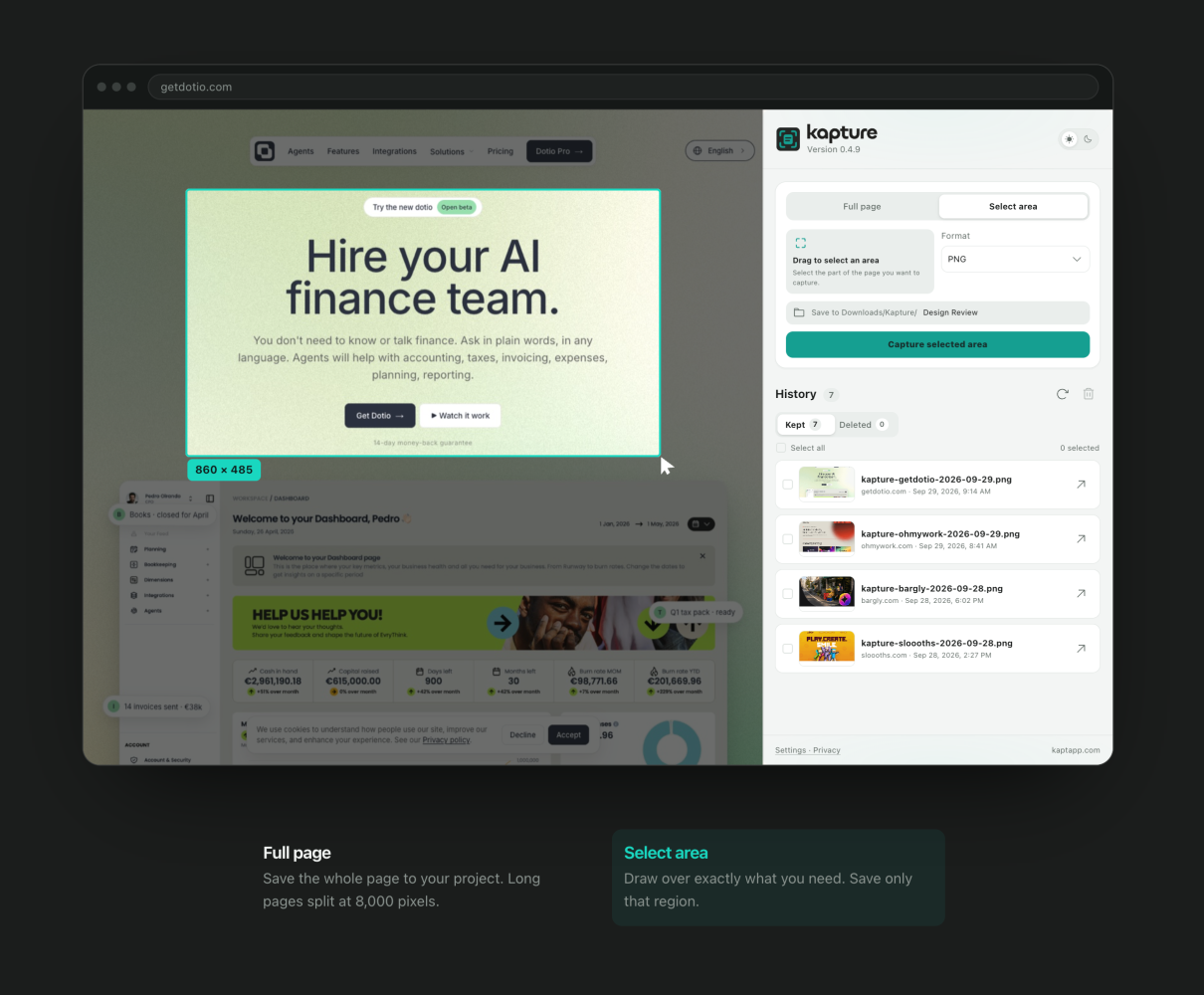
The Chrome extension can capture full webpages or selected areas, work with common responsive sizes, export PNG, JPEG and PDF, and maintain a local history of captures. For very long pages, the image output is split at 8,000 pixels so the files stay manageable. Screenshots are created locally and do not require an account. Chrome Web Store
None of those decisions are particularly spectacular on their own. That is kind of the point. They came from the work.
Building became part of the discovery
This is where the process became very different for me.
Instead of designing the whole thing first and then finding out what Chrome would allow, I could answer many of those questions by actually building it.
Can an extension reliably capture a very long webpage? Try it.
What happens if the page is 20,000 pixels high? Test it.
How should selected-area capture behave when somebody wants a square, landscape or portrait format? Build the interaction and use it for a few days.
What happens when Chrome simply refuses to let an extension capture a protected page? That is no longer a theoretical edge case sitting in a design file. It becomes part of the product behaviour you need to understand and communicate. Chrome does, for example, restrict capture on the Chrome Web Store, chrome:// pages and some internal browser screens. Chrome Web Store
That feedback loop is incredibly useful.
A design can look completely reasonable until the real system starts pushing back.
And I like that.
It means implementation is now part of how I discover the product, rather than something that happens after I finish discovering it.
The product started telling me what came next
Once I had Kapture running and started using it properly, another problem became much more obvious. Capturing the screenshot is only half the job.
The other half is finding it again.
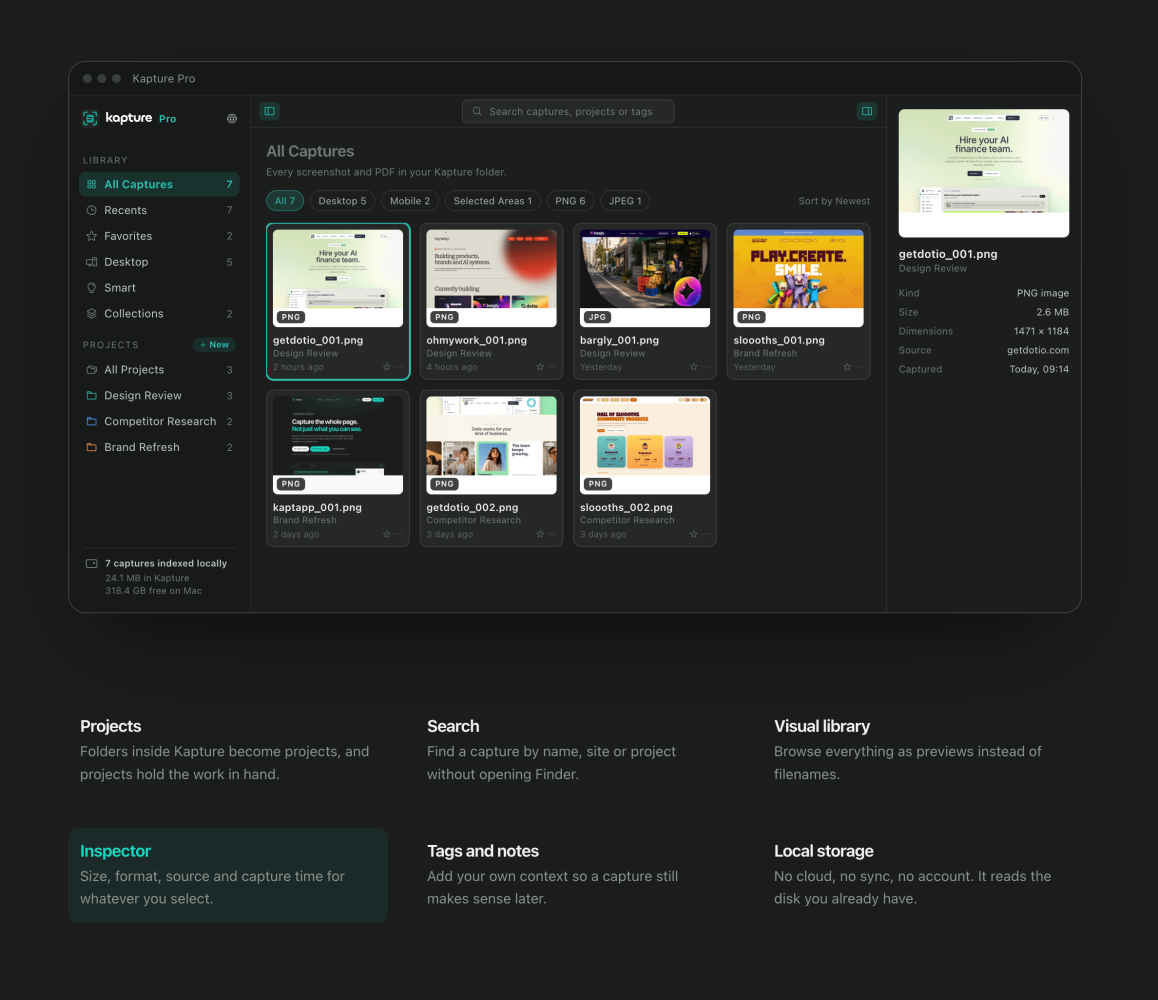
If you work in design, research or product, it does not take very long before you have hundreds or thousands of screenshots. References, competitors, ideas, states, bugs, products, visual directions, things you liked three months ago and cannot remember where they came from.
That changed the scope of Kapture.
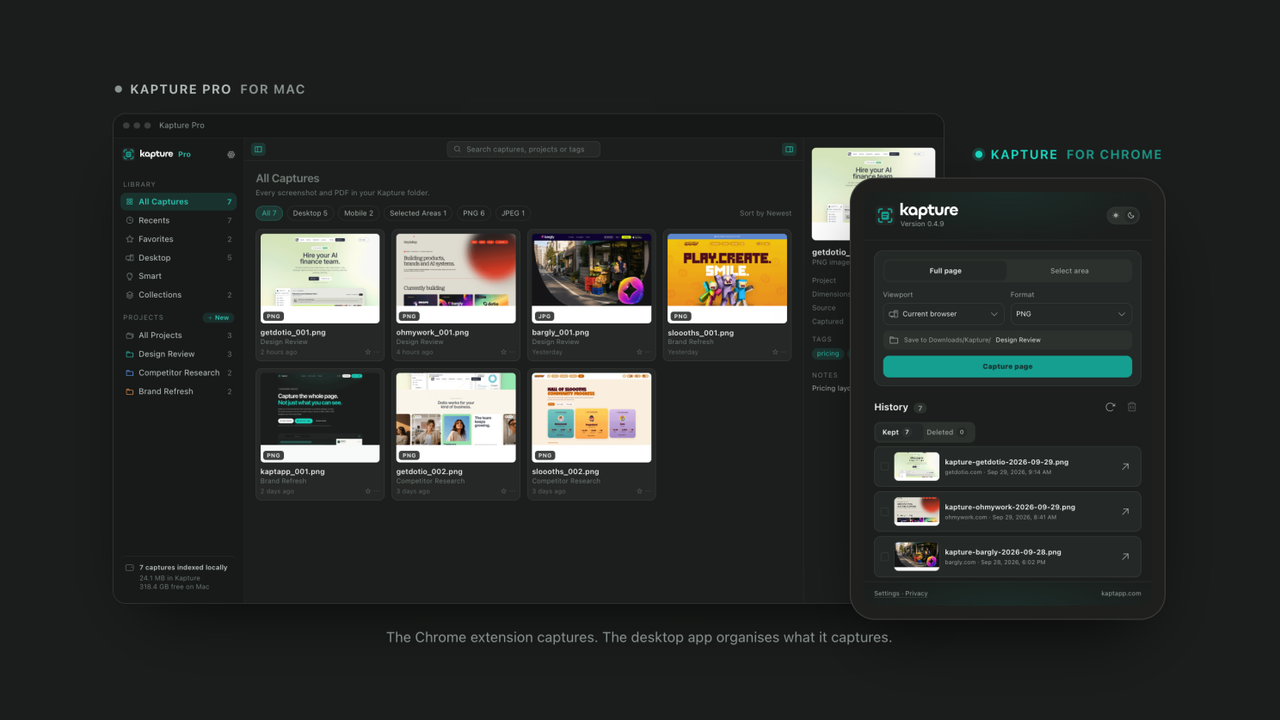
The extension was becoming useful for creating the material. But I started thinking much more about what happens afterwards: projects, search, a visual library, inspection, tags, notes, metadata and local organisation.
That is how the idea for Kapture Pro and the desktop experience began to take shape.
Not because I sat down at the beginning and decided that Kapture needed to become a platform. Because using the first product exposed the next problem.
For me, that is one of the most valuable things about being able to stay closer to implementation now. You discover opportunities while the product is alive, not only while it is represented in Figma.
Two weeks later, there were real people using it
The other thing that changed the conversation was data.
Within roughly two weeks we had 53 installs.
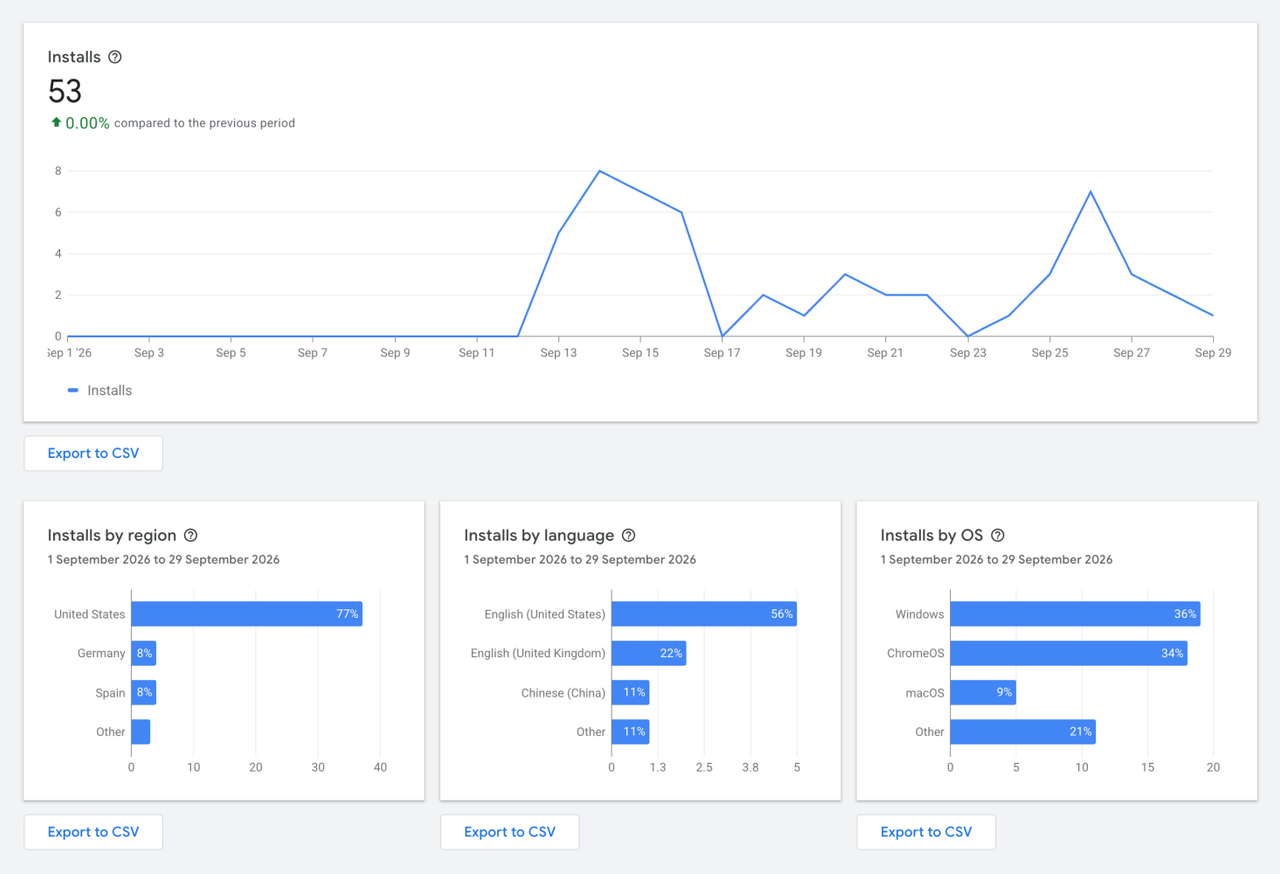
That number is obviously tiny compared with an established product, and I am not trying to pretend otherwise. But for something that started because I personally wanted a better screenshot workflow, 53 real installations are much more interesting to me than 4,300 theoretical users in a presentation.
More importantly, they started telling us things.
We could see Kapture being used across macOS and Windows. We had people coming from Spain, Germany, the United States and other markets. Around 11% of the early audience came from China, while roughly three quarters of usage was in English.
Suddenly some decisions that would have been assumptions became much easier to make.
If people are already using the extension across Windows and Mac, does a dedicated desktop experience make sense?
Probably.
If a meaningful part of the first audience is already coming from outside the English-speaking markets, should localisation be part of the architecture rather than something we bolt on much later?
Yes.
Those are small signals. I know that.
But product decisions do not always need enormous datasets before they become useful. Sometimes you need enough evidence to decide what deserves the next experiment.
That is what we did.
We are now preparing dedicated Kapture apps for macOS and Windows.
This is the part of AI that interests me
There is obviously a lot of AI involved in how I work now. But I think saying “AI helped me build an extension quickly” misses the interesting part.
The tools make execution much faster. I can investigate a codebase, work through an implementation problem, debug behaviour, understand an API, test alternatives and move between design and development in ways that would have been much more difficult for me a few years ago.
That is a huge change.
But AI did not tell me that the original screenshot workflow was annoying. It did not decide which part of that friction was worth solving.
It did not know when an interaction felt unnecessarily complicated. It did not interview users for me, interpret every behaviour correctly or decide that the growing library of screenshots was becoming a more interesting problem than capture itself.
Those are product decisions. And that is probably where my 26 years of experience matter more now, not less.
The technology has dramatically shortened the distance between having an idea and being able to test whether that idea survives contact with reality.
It has not removed the need to know which ideas are worth testing.
My process is still design. It just goes further now.
I still start with discovery.
I still research.
I still care about branding, typography, visual language, interaction details and whether the whole product feels coherent.
I still test things with people and pay much more attention to what they actually do than what I hoped they would do.
But now I can follow the work much further.
I can make a product decision, implement enough of it to see the consequences, discover that I was wrong, change the architecture or interaction, test again and bring what I learned straight back into the design.
That changes the quality of the conversation I have with developers too. Understanding more of what happens behind the interface does not make collaboration less important. It gives us more shared context and lets us challenge decisions much earlier.
I have written before that I stopped thinking only in screens. Kapture is probably the clearest example of what I meant.
The screen is still important. UI and UX are still a huge part of what I do. But the work does not stop there anymore.
A small personal frustration became a Chrome extension. Real usage exposed a larger organisational problem. That led to a desktop product, support for different operating systems and decisions about localisation, privacy, metadata and how all those pieces should eventually work together.
And most of that happened in around two weeks.
The speed is impressive, of course.
But that is not the part I find most interesting.
The interesting part is that building has become part of how I design.